Home › Best for small business
The best email signature for small business in 2026
A small business needs what enterprises need — consistent, branded signatures on every employee's email — without an IT department or enterprise pricing. Here is how the options actually compare (ProSignature is ours; we say so throughout).
Short answer for 2026: for a team of 2–15 with no IT person, pick an app-level tool that shares one locked design and installs it per person — ProSignature (ours; free to start, one-click Gmail install) or WiseStamp Basic ($19/month + $1/employee/month billed annually). If you have an IT admin and 25+ mailboxes with a compliance mandate, Exclaimer is the better pick (from $0.90/user/month, ten-user minimum, applied at the mail server). For one solo signature with no account, HubSpot's free generator is enough.
Last updated
What a small business actually needs from signatures
For a company of two to fifteen people, the email signature is the most-seen piece of branding you own: a 10-person team sending 40 emails a day each puts your brand in front of inboxes roughly 100,000 times a year. The requirements are concrete: every signature matches the brand (same logo, colors, layout), new hires get theirs without a tutorial, the owner can change everyone's banner for a promotion, and the whole thing costs less than a coffee run. What you do not need is server-side rewriting, compliance workflows or an IT admin — the enterprise features that dominate this market's pricing. We wrote a broader small-business signature guide; this page is about picking the tool.
What ProSignature costs a 5-person business
$4/month billed yearly, $0.80 per person: 5 people × $0.80 = $4/month billed yearly ($48/year). Billed monthly: 5 people × $1.20 = $6/month billed monthly. The owner counts as one of the people, there is a 5-person minimum and no platform fee, 10 people cost $8/month billed yearly, and Teams starts with a 14-day free trial. The owner's own signature is free (one small 'Created with ProSignature' line; Pro removes it). The full breakdown, setup steps and FAQs are on email signatures for small business teams.
Prices read from the app's pricing constants on 18 October 2026; free-plan credit-line policy as of 27 September 2026. Prices in USD.
The realistic options for a 2–15 person business
ProSignature (our product) — built for exactly this
Free for the owner to start: brand auto-imported from your website, 13 email-safe templates, one-click Gmail install. The Team plan adds one locked design with each employee's details, installed by each person from a personal link — no admin console, no server changes. See how team deployment works.
WiseStamp — solid, priced per seat plus a base fee
Its small-business product (Basic) runs $19/month plus $1/employee/month billed annually (verified August 2026) — fine at 15 seats, steep at 3. The individual Pro+ tier ($9/month) covers up to 10 members at $2/month each. One-click Gmail sync ships on its paid plans.
Exclaimer — enterprise plumbing you probably don't need
Server-side signature injection for Microsoft 365/Google Workspace. Powerful for 200-seat compliance needs; overkill in setup for a small team — per-seat pricing is actually low (from $0.90/user/month billed annually, ten-user minimum), but it needs admin access to your mail platform. Our Exclaimer alternative page goes deeper.
HubSpot free generator — free, but per-person manual work
Genuinely free with no account required, but installation is copy-paste and there is no central push to employees' inboxes — every employee builds and pastes their own, which is how brand consistency dies.
Doing nothing (the default) — the hidden cost
Mismatched fonts, personal-email replies and 'Sent from my iPhone' are what most small businesses ship today. Free to fix: start with our examples gallery and the professional email address guide.
The options at a glance (competitors verified 18 August 2026; ProSignature prices as of 18 October 2026)
| Tool | Free tier | Team deployment | Gmail install | Price for a team |
|---|---|---|---|---|
| ProSignature (ours) | Yes — free plan (small credit line; Pro removes it) | One locked design; a personal install link per person | Chrome extension (no permission), or 1-click Google connect | Free to start; Teams $0.80/person/mo billed yearly, 5-person minimum, no platform fee ($4/mo for up to 5 people) |
| WiseStamp | No plan — free generator + 14-day trial | Central, app-level | Sync on paid plans; free generator uses its Chrome extension | Basic $19/mo + $1/employee/mo (annual); Pro+ $9/mo plus up to 10 members at $2/mo each |
| Exclaimer | No — 14-day trial | Server-side via your M365/Workspace admin | Applied at the mail server (client-side option exists) | From $0.90/user/mo (annual), 10-user minimum |
| HubSpot generator | Yes — free, no account required | None — each person pastes their own | Copy-paste | Free |
The two-tier decision, honestly
If you are a solo owner today: use a genuinely free tool — ours (free plan; one small credit line that Pro removes) or HubSpot's generator (free, no account required) — and upgrade only when you hire. If you have employees: the math is per-seat price × seats + the base fee, times the odds your team actually installs it. That last factor is why installation method matters more than template count — a $1/seat tool nobody installs costs more than a $2/seat tool that deploys centrally. ProSignature rolls a locked design out by personal link; Exclaimer requires IT setup; HubSpot has no central deployment — each person pastes their own. Full market survey in the best signature generators roundup.
Rolling out signatures to your team
- Build the company signature once — brand imported automatically, design locked in one of the 13 templates.
- Add each person by email with their title and phone; employees have no login and no editor.
- Install: each teammate adds it to Gmail from a personal link with the free Chrome extension, or pastes it into Outlook or Apple Mail.
- Update once: change the banner or CTA and every extension install picks it up on its next sync (pasted copies are pasted again).
Industry rules apply on top: real-estate license numbers, legal disclaimers for advisors — the legal requirements guide lists them by field.
Signatures as a marketing channel
Once every employee's signature is consistent, the signature block becomes owned ad space: a booking or review CTA under every email, a campaign banner you swap monthly (make one free with the AI Banner Maker), and UTM-tagged links so the clicks show up in analytics. The playbook is in email signature marketing — it is the highest-leverage free channel most small businesses never switch on.
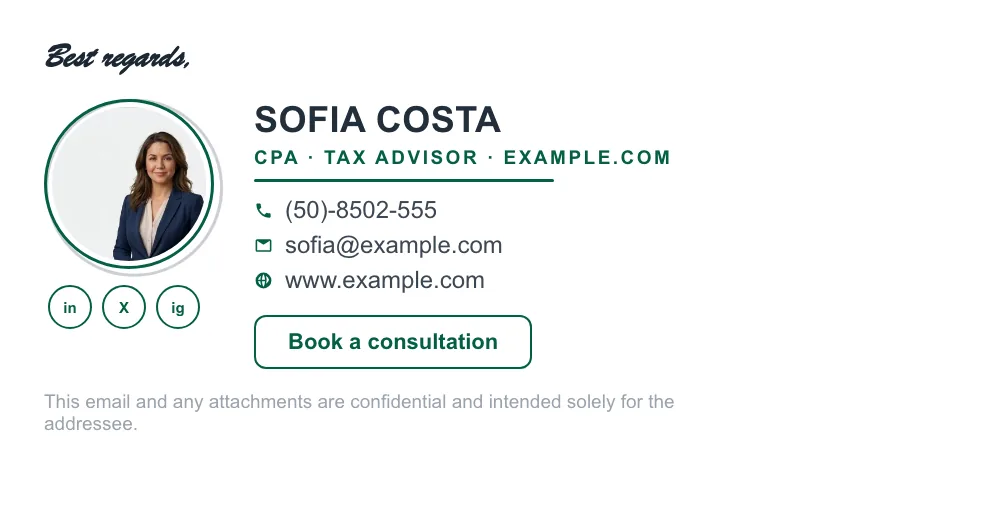
What a small business signature looks like in practice
Three layouts covering the situations most small businesses are actually in.


Who wrote this, and how it is kept accurate
Written and maintained by the ProSignature team. We build ProSignature, which appears in this comparison — so treat it as a vendor source and judge the reasoning rather than the ranking. We think a vendor who shows their working and names the cases where a competitor wins is more useful than one who does not, but you should weigh it accordingly.
Our editorial rules, in full:
- Every competitor price and feature claim is checked against that company's own live pricing page on the day of writing, and the date is printed on the page. Competitor prices on the roundup and pricing pages were verified 18 October 2026; older comparison pages carry their own dates.
- If we could not verify a figure that day, we name the tool and omit the number rather than repeating it from another listicle.
- We state explicitly where a competitor is the better choice — for example Exclaimer for IT-administered fleets above roughly 25 mailboxes.
- No affiliate links, anywhere on this site. Nobody pays us for placement and no vendor reviews these pages before publication.
- We do not publish invented ratings, incentivised reviews or unsubstantiated superlatives.
Found something out of date or wrong? It probably is — pricing changes constantly. Tell us and we will correct it. More about the company and how we work: About ProSignature.
Build the signature everyone compares against
Your logo, colors and links are pulled from your website automatically — install into Gmail in one click, free.
Create my signature — freeWorks with Gmail and Google Workspace (one super-admin approval installs it in every mailbox), Outlook and Microsoft 365 (copy-paste), Apple Mail.
Frequently asked questions
What is the best email signature tool for a small business?
For teams of 2–15 without an IT person: a tool with one locked design and a personal install link per person. ProSignature (our product) does that with a free individual start; WiseStamp Basic is the established alternative at $19/month + $1 per employee (August 2026 pricing); Exclaimer targets larger IT-managed fleets.
How much should a small business pay for email signatures?
From $0 (solo, free tiers) to roughly $1–3 per employee per month at team scale. Watch base fees: a $19/month platform fee is negligible at 15 seats and dominant at 3.
Should every employee have the same signature?
Same design, personal details. Locked layout, logo and colors with each person's own name, role and phone is the standard that reads as professional — and a locked design is what keeps it that way.
Can I manage team signatures without an IT person?
Yes — that is the point of app-level tools like ProSignature and WiseStamp: employees connect their own Gmail in a click. Tools like Exclaimer connect at your mail-platform level, which needs admin access (there is also a client-side option for Outlook and Gmail).
Do email signatures matter for a small business?
Disproportionately: a 10-person team generates ~100,000 branded impressions a year from signatures alone, and a consistent block with a booking CTA turns routine email into a lead channel.
How much does ProSignature cost for a team of 5?
$4/month billed yearly ($48 for the year) or $6/month billed monthly. The arithmetic is 5 people × $0.80 = $4/month billed yearly, or 5 people × $1.20 = $6/month billed monthly. The owner counts as one of the 5 people, 5 is also the minimum, and there is no platform fee; 10 people cost $8/month billed yearly. Teams starts with a 14-day free trial.